
CSS Question Paper solution May 2023 – Part 2
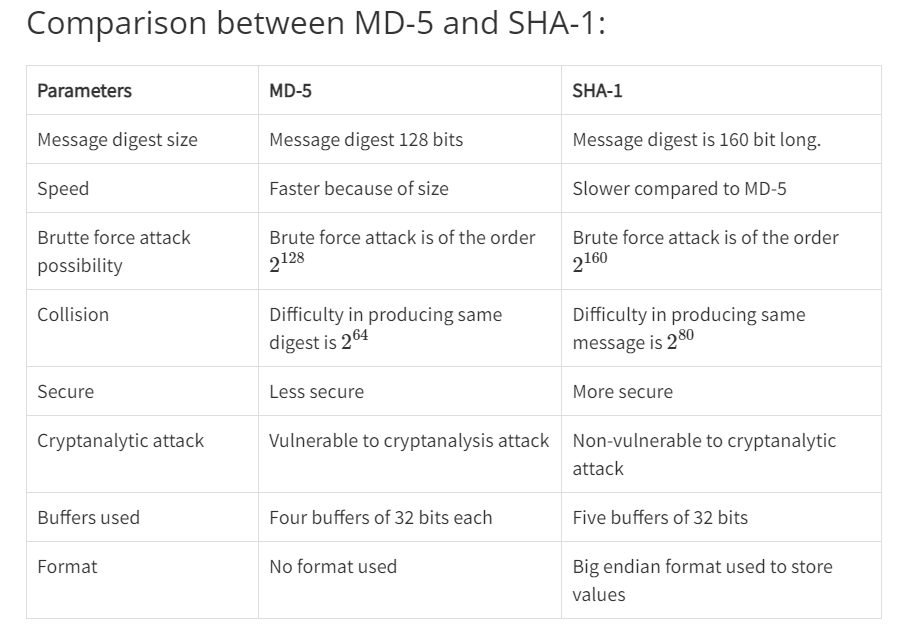
3 a ) What are properties of hash function? Compare MD-5 and SHA hash algorithm.
the properties of a hash function
- Deterministic: For the same input, a hash function must always produce the same output. This property ensures consistency and reliability in hash computations.
- Fast Computation: Hash functions should be computationally efficient, allowing for quick computation of hash values even for large inputs. This property enables hash functions to be widely applicable in various applications without significant performance overhead.
- Pre-image Resistance: Given a hash value, it should be computationally infeasible to find any input that produces that hash value. In other words, it should be difficult to reverse the hash function and recover the original input from its hash value.
- Second Pre-image Resistance: Given an input, it should be computationally infeasible to find another input that produces the same hash value. This property ensures that given one input, it is difficult to find another input with the same hash value.
- Collision Resistance: It should be computationally infeasible to find any two distinct inputs that produce the same hash value. This property ensures that it is difficult to find collisions, where two different inputs produce the same hash value.
- Avalanche Effect: A small change in the input should produce a significantly different output. In other words, even a minor change in the input should result in a completely different hash value. This property ensures that similar inputs produce very different hash values, enhancing security.
3 b ) Explain Diffie hellman key exchange algorithm.
Answer : /q/explain-diffie-hellman-key-exchange-algorithm/
4 a ) What do you understand by digital signatures and digital certificates? Explain digital signature scheme RSA.
Digital Signatures:
Digital signatures are cryptographic techniques used to provide authenticity, integrity, and non-repudiation to digital messages or documents. A digital signature scheme involves a pair of cryptographic keys: a private key, known only to the signer, and a public key, available to anyone who needs to verify the signature.
Here’s how a digital signature process typically works:
- Signing: The sender (signer) applies a mathematical algorithm to the message or document using their private key, generating a unique digital signature.
- Verification: The receiver (verifier) uses the sender’s public key to decrypt and authenticate the signature. If the signature is valid, it confirms that the message or document was signed by the sender and that it has not been altered since.
Digital signatures provide several benefits:
- Authenticity: They verify the identity of the sender.
- Integrity: They ensure that the message has not been altered since it was signed.
- Non-repudiation: The sender cannot deny having signed the message.
Digital Certificates:
Digital certificates, also known as public key certificates or identity certificates, are electronic documents that bind cryptographic keys to entities such as individuals, organizations, or websites. Digital certificates are issued by trusted third-party entities known as Certificate Authorities (CAs). These certificates contain information about the certificate holder, the public key associated with the holder, the digital signature of the CA, and other relevant metadata.
Digital certificates play a crucial role in establishing trust in online communications and transactions. They are used in various applications, including secure web browsing (SSL/TLS certificates), email encryption (S/MIME), code signing, and secure network communication (VPN).
Explain digital signature scheme RSA.
4 b ) Explain memory and address protection in detail. Write a note on file protection. [10]
Anwer /q/explain-memory-address-protection-detail/
5 a ) Enlist various functions of protocols of SSL. Explain the phases of handshake protocol.
functions of protocols of ssl : /q/enlist-functions-protocols-ssl/
The SSL handshake is the initial process that occurs when a client, such as a web browser, connects to a web server over SSL/TLS. The SSL handshake involves a series of steps to establish a secure and encrypted connection between the client and server.
phases :
ClientHello: The SSL handshake begins when the client sends a ClientHello message to the server. The message includes information about the SSL/TLS version supported by the client, a random number, and a list of supported cipher suites.
ServerHello: The server responds with a ServerHello message, which includes the SSL/TLS version that will be used for the connection, a random number, and the chosen cipher suite.
SSL/TLS Certificate: The server sends its SSL/TLS certificate to the client, which includes the server’s public key and other identifying information. The certificate is verified to ensure that it is issued by a trusted certificate authority (CA).
ClientKeyExchange: The client sends a message to the server containing a pre-master secret key, which is encrypted using the server’s public key from the SSL/TLS certificate.
ServerKeyExchange: Depending on the chosen cipher suite, the server may send a ServerKeyExchange message to the client, which includes additional cryptographic parameters required for the key exchange.
CertificateRequest: If the server requires the client to authenticate itself, it sends a CertificateRequest message, requesting the client’s SSL/TLS certificate.
ServerHelloDone: The server sends a ServerHelloDone message to indicate that the SSL/TLS handshake is complete.
CertificateVerify: If the client has provided an SSL/TLS certificate, it sends a CertificateVerify message to prove the authenticity of the certificate.
5 b ) Briefly explain database security. What do you understand by multilevel database security.
Answer : /q/briefly-explain-database-security/
6 Write short notes on any four: [20]
6 a ) Web browser attacks
Web browser attacks encompass a range of malicious activities aimed at exploiting vulnerabilities in web browsers or leveraging the browser as a vector to attack users. Types of web browser attacks:
- Cross-Site Scripting (XSS):
- XSS attacks involve injecting malicious scripts into web pages viewed by other users.
- Attackers exploit vulnerabilities to execute scripts in the victim’s browser, leading to actions like session hijacking, data theft, or defacement.
- Types include reflected XSS, stored XSS, and DOM-based XSS.
- Cross-Site Request Forgery (CSRF):
- CSRF attacks trick users into performing unintended actions on a website where they are authenticated.
- Attackers forge requests from the victim’s browser to perform actions like transferring funds, changing settings, or posting content.
- Mitigation includes CSRF tokens, SameSite cookies, and user interaction requirements.
- Clickjacking:
- Clickjacking involves disguising malicious actions beneath legitimate user interface elements.
- Attackers overlay invisible elements on web pages to trick users into clicking on buttons or links, potentially leading to unintended actions.
- Mitigation involves frame-busting scripts, X-Frame-Options headers, and Content Security Policy (CSP) directives.
- Browser Redirection:
- Phishing attacks exploit browser redirection to redirect users to malicious websites.
- Attackers use deceptive links or scripts to redirect users to phishing sites, malware downloads, or credential theft pages.
- Mitigation includes URL validation, safe browsing practices, and security awareness training.
- Drive-By Downloads:
- Drive-by downloads exploit browser vulnerabilities to download and execute malicious code without user consent.
- Attackers compromise legitimate websites to deliver malware or exploit kits that target known browser vulnerabilities.
- Mitigation includes keeping browsers and plugins updated, using antivirus software, and enabling browser security features.
- Malvertising:
- Malvertising involves embedding malicious code in online advertisements displayed by web browsers.
- Attackers exploit ad networks to distribute malware or redirect users to malicious websites.
- Mitigation includes ad blockers, regular security updates, and browser security settings.
- Session Hijacking:
- Session hijacking attacks exploit insecure session management mechanisms to take control of authenticated sessions.
- Attackers steal session tokens or cookies to impersonate users and perform unauthorized actions.
- Mitigation includes secure session handling, HTTPS usage, and session expiration policies.
6 b ) X.509
answer : /q/write-short-note-509-css/
6 c ) Cross site request forgery
Cross-Site Request Forgery (CSRF) is a type of security vulnerability that allows an attacker to manipulate a victim user’s actions on a website where the user is authenticated. In a CSRF attack, the attacker tricks the victim into unknowingly executing actions on a web application that they are authenticated to, without their consent.
Steps :
- Authentication: The victim user is authenticated to a web application, usually by logging in and receiving a session token or cookie that authenticates their actions on the site.
- Attack Preparation: The attacker crafts a malicious web page or email that contains a request to the target web application. This request is usually in the form of a URL or a form submission.
- Tricking the Victim: The attacker lures the victim into visiting the malicious web page or clicking on the malicious link, often by disguising it as something legitimate or enticing.
- Executing the Attack: When the victim visits the malicious page, their browser automatically sends the authenticated request to the target website without their knowledge. Since the victim is already authenticated, the website believes that the request is legitimate and processes it.
- Unintended Action: The target website executes the request, which could be actions like changing the victim’s email address, making a purchase, transferring funds, or any other action that the victim has permission to perform.
CSRF attacks can have serious consequences, including unauthorized transactions, data modification, or account compromise. To protect against CSRF attacks, web developers can implement measures such as:
- CSRF Tokens: Including unique tokens in forms or URLs that are verified by the server before processing requests.
- SameSite Cookies: Setting the SameSite attribute on cookies to restrict their usage to same-site requests, which can mitigate CSRF attacks.
- Referer Header Checking: Verifying that requests originate from the same site, although this method has limitations and can be bypassed in some cases.
- User Interaction: Requiring user interaction for sensitive actions, such as confirming a transaction or entering a password.
- Security Headers: Implementing security headers like Content Security Policy (CSP) to reduce the risk of malicious code execution
6 d ) DNS attack
Answer : /q/short-note-dns-attack/
6 e ) Email attacks.
Email Attacks:
- Phishing:
- Definition: Fraudulent attempts to gather sensitive information by impersonating reputable sources via email, instant messaging, or social media.
- Types: Regular phishing and highly targeted spear phishing.
- Disadvantage: Easily detectable if users are cautious.
- Vishing:
- Definition: Phishing using voice communication technology.
- Tactics: Spoofing calls from trusted sources or using recorded messages to obtain sensitive information.
- Exploits trust in telephone networks.
- Smishing:
- Definition: Phishing via text messaging on mobile phones.
- Tactics: Impersonates legitimate sources to gain victim’s trust, often involving malware installation through deceptive links.
- Whaling:
- Definition: Targeted phishing attacks on high-profile individuals within organizations.
- Targets: Senior executives, politicians, celebrities.
- Disadvantage: Requires high sophistication and social engineering skills.
- Pharming:
- Definition: Impersonation of authorized websites to deceive users into entering credentials.
- Method: Misdirects users to fake websites resembling legitimate ones.
- Spyware:
- Definition: Software enabling criminals to obtain information about user’s computer activities.
- Features: Activity tracking, keystroke collection, data capture, and modification of security settings.
- Distribution: Often bundled with legitimate software or Trojan horses.
- Scareware:
- Definition: Malware persuading users to take specific actions based on fear.
- Tactics: Forges pop-up windows resembling system alerts to trick users into executing malware.
- Adware:
- Definition: Displays pop-up advertisements to generate revenue.
- Tactics: Analyzes user interests to display relevant ads, may install automatically with software.
- Spam:
- Definition: Unsolicited emails, often used for advertising or distributing harmful content.
- Source: Sent from compromised computers infected by viruses or worms.
- Goal: Obtain sensitive information such as social security numbers or bank account details.
Protection Measures:
- Exercise caution with emails from unknown sources.
- Watch for phishing signs like spelling errors, suspicious links/attachments, and requests for personal information.
- Strengthen email security with strong passwords and two-factor authentication.
- Keep computer and software updated with security patches.
- Utilize antivirus and anti-malware software to detect and prevent email attacks.
References :
https://www.geeksforgeeks.org/block-cipher-modes-of-operation
https://www.tutorialspoint.com/the-diffie-hellman-key-exchange