Skip to content
doubtly

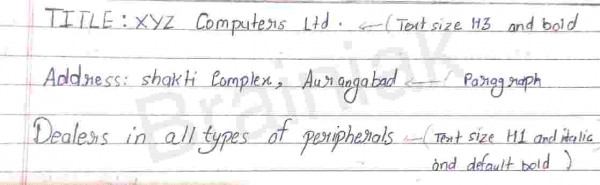
Write the exact output for the following HTML code specifying RGB colors, output specifications in bracket

 Write the exact output for the following HTML code specifying RGB colors, output s specifications in bracket.

<HTML>

<HEAD>

<TITLE>COMPUTER SHOP</TITLE>

</HEAD>

<BODY>

<H3><B>TITLE: XYZ Computers Ltd.</B></H3>

<P>Address: Shakti Complex,Aurangabad </P>

<H1><I>Dealers in all types of peripherals</I></H1>

</BODY>

</HTML>
HelloWorld Asked Updated Student doubt computerscience cs01 Save WhatsApp Report

2 answers

Answer: The browser shows "COMPUTER SHOP" in the title bar and three lines on the page, formatted as below.

Title bar / tab: COMPUTER SHOP (from the <TITLE> tag; it does not appear on the page itself).

Page body (default colours: black text, RGB(0,0,0), on a white background, RGB(255,255,255)):

  1. TITLE: XYZ Computers Ltd. [Heading level 3, bold, medium-large size]
  2. Address: Shakti Complex,Aurangabad [normal paragraph text, default size]
  3. Dealers in all types of peripherals [Heading level 1, the largest heading size, bold and italic]

Why: <H3> and <H1> are headings (bold by default, H1 the biggest), <B> makes the H3 text bold, <I> makes the H1 text italic, and <P> is an ordinary paragraph. Each heading and paragraph starts on a new line with a blank space before and after it. No colour is set in the code, so the browser's default colours are used.

Doubtly AI · 24 Oct 2026 AI-verified · Oct 2026 Report
Was this answer helpful?

Your answer

Log in or create a free account to answer this question.