When we first install Svelte.js on our system, the starter template comes with the following structure by default:
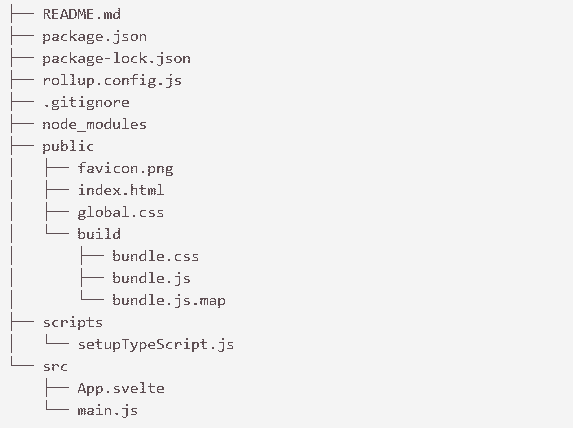
Let's see them in detail:
package.json and package-lock.json: The package.json and package-lock.json contain the information about the project that Node.js/npm uses to keep it organized.
node_modules: The node_modules file specifies where the node saves the project dependencies. These dependencies are used for development purposes only and won't be sent to production.
.gitignore: This is used to tell git which files or folders to ignore from the project. It is required if you decide to include your app in a git repo.
rollup.config.js: In Svelte, the rollup.config.js is used as a module bundler. This configuration is used to tell rollup how to compile and build your app. It would be skipped if you use webpack to create your starter project with npx degit sveltejs/template-webpack svelte-app.
scripts: It contains the required setup scripts. Currently, it holds only contain setupTypeScript.js.
src: This directory is used to specify where the source code for your application lives and where you have to create the code for your app. It contains two components: App.svelte and main.js
- The svelte is the app's top-level component, which renders the 'Hello World!' message.
- The js is the entry point to the application, which is used to instantiate the App component and binds it to the body of your html page.
public: The public is a directory containing all the files required to be published in production. This directory consists of the following files:
- png: This is the by default favicon for the app. Currently, it shows the Svelte logo.
- html: This is the main page of the app. Initially, it's just an empty HTML5 page that loads the CSS files and js bundles generated by Svelte.
- css: The global.css file contains the unscoped styles. It is a regular CSS file that is applied to the whole application.
- build: The build folder is used to contain the generated CSS and JavaScript source code.
- css: The bundle.css file is generated from the styles defined for each component of Svelte.
- js: The bundle.js is a JavaScript file that is compiled from all the JavaScript source code.
